 FMJ Facilities Management magazine providing industry-specific intelligence to FM and property professionals


Helen Beebe, Managing Director of AJ Products UK, on what to look for when choosing ergonomic furniture, and why the wrong choices come at a cost to desk workers and employers
Musculoskeletal disorders cost UK businesses an estimated £5.7 billion annually. In 2024 AJ Products conducted a survey of 2,015 desk workers and found that more than one in five experience daily neck, shoulder and back pain. Nearly 30 per cent go three hours or more without leaving their workstation. These results reveal the workplaces where ergonomics are treated as an afterthought.
Ergonomics must move beyond theory, yet purchase decisions are still often driven by unit cost. The result is furniture that appears functional but gradually fails the people who use it. Any initial savings are soon outweighed by absence, staff turnover and lost productivity.
SEATING
The office chair is the most significant piece of equipment in a desk-based workplace, and the most underspecified. The first question shouldn’t be about price or appearance. It should be: how long will this chair be used each day?
A chair that works fine for two hours of occasional desk work is a different product from one designed for an eight-hour shift. For full-time desk workers, independent adjustability is key; seat height, seat depth, lumbar support and armrests. Feet should rest flat on the floor, knees at roughly 90 degrees, with a small gap between the seat edge and the back of the knee to keep circulation moving. The lumbar support needs to follow the curve of the individual’s spine, which means it must be adjustable not a fixed generic pad.
Consider the importance of armrests. Positioned correctly, they take the weight of the arms off the shoulders and neck across the whole day. Too high, and they push the shoulders up. Too low, and they’re simply decorative. The right position is elbow height when the user is seated and relaxed.
The mechanism, how the chair responds to the body’s movement, is where a lot of specifications fall short. For anyone desk-based for most of their working day, a synchronised mechanism, where seat and backrest move together on recline, is the minimum to specify. It keeps the body in alignment as it shifts, rather than forcing it to brace against a static backrest.
For more demanding settings such as control rooms, shift-based environments and anywhere a chair might be in continuous use, an asynchronous mechanism offers the independent adjustability that those hours require. The specification needs to be matched to the individual needs.


DESKS
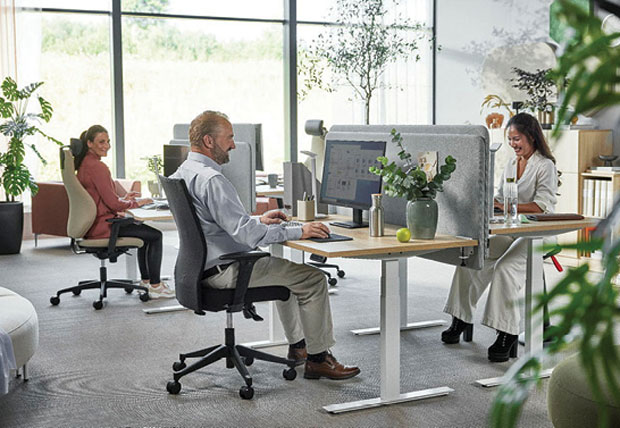
Even a well-chosen chair cannot compensate for a desk at the wrong height. The appropriate range for most seated users sits between 85 and 100 centimetres, but that figure must correspond to the individual’s build and chair position. Getting one right without addressing the other creates a mismatch that compounds over time.
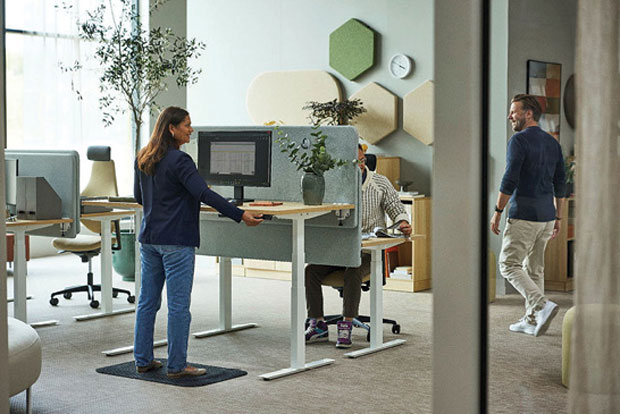
Height-adjustable desks directly address this. Alternating between sitting and standing throughout the day improves circulation, reduces fatigue and takes pressure off the lower back. What I see regularly, though, is the adjustment function going unused once the novelty wears off. The habit must be established alongside the equipment, otherwise a height-adjustable desk becomes an expensive fixed one.
Desk shape is also underestimated. A wave or curved desktop lets the user sit closer to their work, which reduces the forward lean that loads the neck and upper back over time. For users managing multiple screens or working with a lot of materials, a corner or L-shaped configuration keeps everything within reach without the repetitive reaching that builds into injury.
ACCESSORIES
A good chair and the right desk can still produce poor outcomes if the equipment on the desk creates the wrong posture. Monitor position is the most frequent failure. Screens too low pull the head forward and down, and that load on the neck and upper spine adds up across the working day. A monitor arm that positions the screen at eye level, 50 to 80 centimetres from the face, fixes this and allows adjustment as working patterns change.
Forearm and wrist support reduce the cumulative effect of extended keyboard and mouse use. A footrest is a simple solution for shorter users whose feet don’t sit flat once the desk and chair are correctly set for them.
NOISE
Ergonomics isn’t just about physical alignment; it is also about the acoustic environment.
Sustained workplace noise is a recognised cause of fatigue, stress and reduced concentration as the sound environment creates a constant cognitive load. Desk and floor screens, acoustic panels & upholstered seating all help reduce noise and the mental effort of working through it.
Every piece of ergonomic workplace furniture needs to be considered as an investment, not a cost. Make the right decision before any repercussions appear through absence, performance and retention figures.